
TickPick - Live Event Tickets
TickPick LLCEvents
4.87.38K Reviews
- Version
- 6.0.25
- Installs
- 5.00M
- Age Rating
- Everyone
Screenshots



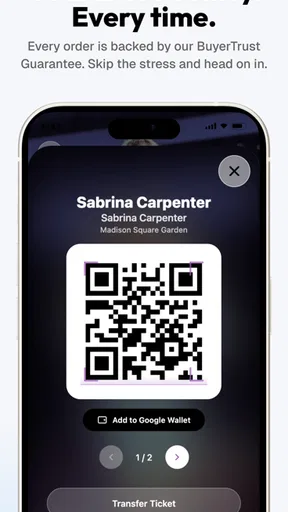
Our Review of TickPick - Live Event Tickets
 Analysis by Appyee
I often end up planning an event with someone else: one person spots a concert, another checks dates, and then we have to agree on seats and a budget. That is where TickPick can be useful. It is an events app for browsing tickets to concerts, sports, and theater, and I find it most helpful when I want to compare options before the group commits. It is free to download, and the app is made by TickPick LLC.
One phone, several people, and a shared decision
A realistic use for it is a weekend plan that starts casually: a friend suggests a game, a partner wants to know whether the seats are worth the cost, and nobody wants to buy before everyone has checked the date. I would use the app to look up the event, review the available seating choices, and share the details with the group through whatever communication method we already use. That keeps the decision grounded in the same event and seating layout rather than a string of vague messages.
The useful household habit is to treat browsing and purchasing as separate steps. One person can research possibilities, but the group should settle the event, section, and spending limit before anyone moves forward with an order. That is especially helpful when tickets are for a family outing or a shared gift: the person searching does not have to assume that everyone agrees just because a promising option appears.
I would not treat a shared phone as a shared ticket account by default. If several people use one device, pause before entering account or payment details and make sure the person completing the purchase is the person who intends to manage it. That simple boundary avoids confusion over whose details are being used and who should keep track of the order afterward.
How I would compare options without rushing
Ticket searches can tempt you to focus on the first appealing price. I think a better workflow is to decide what matters most first: staying within a budget, sitting near the action, or getting a particular area together. Then compare a few seats against that priority. A cheaper ticket is not automatically the best value if the location does not suit the occasion, and a preferred section may not be worth stretching the budget for a casual outing.
The app’s seat map gives the comparison a practical anchor. I would inspect the selected location rather than relying only on a ticket label or price, especially when the group has different expectations about view and proximity. For a theater performance, sightlines may matter more than being close; for a sports game, someone may care more about the atmosphere or a clear view of the play. The right choice depends on the event and the people going.
Compared with searching each venue or seller separately, a ticket marketplace can make it easier to scan options in one place. The trade-off is that availability and listings can change, so a result that looked suitable during a group discussion may not remain available when everyone is ready. I would settle the group’s preferences in advance, then check the current options together rather than assuming a screenshot or earlier search guarantees the same choice later.
Household boundaries, age, and trust
TickPick is rated for everyone, which makes the app appropriate for general audiences to browse. That is different from handing a child unrestricted access to an adult’s purchasing account. For younger users, I would keep the adult responsible for reviewing the event, selecting tickets, and handling checkout. The age rating describes the app’s audience; it does not mean every event is suitable for every age or that a child should manage a purchase.
For a family outing, I would check the event details and practical arrangements before buying: the date, the venue, the seating choice, and whether the plan works for everyone who is going. This is not a special feature of the app so much as sensible ticket-buying discipline. It also helps when one household member is browsing for others who may not be present to look at the seat map themselves.
Trust matters most at the point where browsing becomes a transaction. I would review the final order information carefully and keep the purchase confirmation accessible to the person attending or coordinating the outing. If another person is handling the booking, agree beforehand who will hold the relevant details and communicate them to the group. That is more reliable than assuming everyone can retrieve the same information from a shared device.
Where the app fits—and where I would look elsewhere
With an average rating of 4.8 from around 49,000 ratings, TickPick has a strong reception among people who have rated it. It has also passed one million installs, so it is not an obscure option in the event-ticketing space. Those figures are useful context, but they do not tell me whether a particular event has the right seats or whether a given listing suits my plans. I still judge the options in front of me.
I would start here when I want to browse several kinds of live events and compare ticket choices without opening a separate search for each one. If I already know the exact venue and want to check its own official sales channel, I would compare that too. A venue’s direct route may be more straightforward for a specific event, while a marketplace can be convenient when I am still deciding what to attend or which seating option makes sense. Neither approach is automatically better in every situation.
The app is less useful if your group has not settled on a date, event, or budget and expects browsing alone to resolve those disagreements. It can show choices, but it cannot decide what the group values most. I would also consider another route if I only need information about an event and do not intend to shop for tickets; in that case, a venue or event organizer’s own information may be the more direct starting point.
Small decisions that make the search smoother
My first practical tip is to agree on a ceiling before opening a long list of tempting options. A clear limit makes it easier to compare seats honestly and prevents the group from treating each slightly higher price as a harmless exception. I would also decide whether that limit applies per person or to the whole outing, since those are very different budgets when several people are attending.
Second, use the seat map as a comparison tool, not merely a confirmation screen. Look at the location in relation to what the event involves, then ask whether that position matches the group’s expectations. If one person is choosing for others, describe the location in plain terms and get agreement before buying. This is a simple way to avoid the familiar mismatch between “good seats” and what each person meant by that phrase.
Third, keep the group’s coordination lightweight. Send the event and seating details to the people who need to decide, then set a clear point at which the purchaser will check availability again. This avoids a sprawling conversation where several people keep browsing separate options and nobody knows which one is current. It is particularly handy for a spontaneous plan after work, when a long back-and-forth can derail the outing.
The app was released on November 6, 2014, and its current version is 5.0.58, with support for operating systems from version 8.0 onward. I see that as useful compatibility context if you are setting it up on an older device, but I would still check that the app works properly on the phone you plan to use before relying on it at the last minute. The version number itself does not tell me how a particular device will perform.
What to expect before committing to tickets
One natural question is whether browsing costs anything. The app is free to download, so you can explore it without paying for the app itself. Ticket purchases are a separate decision, and I would read the order details closely before completing one rather than treating a free app as a promise that every part of attending an event has no cost.
Another common question is whether the app is suitable for a family member who is not comfortable with technology. The straightforward browsing and visual seat selection can make it easier to review choices together, but I would still have the person making the purchase take responsibility for the final steps. If someone mainly wants to attend and does not want to compare listings, a relative can research options with them rather than asking them to manage the entire process alone.
People also wonder whether a particular ticket will be right for their group. I would not decide from price alone: compare the seat location, the event, and the group’s priorities, and make sure everyone understands the option being considered. If the event has special requirements or the group needs venue-specific guidance, consult the venue’s own information as well. A ticket marketplace is a useful place to shop, not a substitute for checking the details that matter to your outing.
Finally, I would not buy on behalf of a whole household without agreeing on the plan first. The convenience of finding options quickly can make it easy to move faster than the group’s decision-making. Confirm who is going, what the budget is, and who will retain the purchase information. That small pause is more valuable than endlessly searching for a marginally better option while the group remains undecided.
If you’re like me and love catching live events without the hassle of hidden fees, then you're in for a treat with TickPick. This app has been my go-to for finding tickets to concerts, sports games, and theater shows. Let me walk you through my experience and why I think TickPick is worth your time.
No Fees and Easy Navigation
One of the standout features of TickPick is its no-fee policy. Yep, you heard that right—what you see is what you pay. This transparency is a breath of fresh air compared to other ticketing platforms where hidden fees sneak up during checkout. I love knowing exactly how much I’m spending upfront.
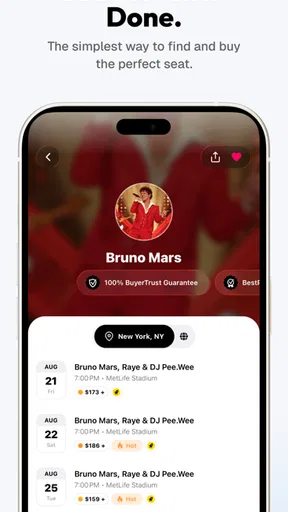
The app’s interface is super intuitive. Whether you're tech-savvy or just someone who likes things straightforward, navigating through event listings, seat maps, and ticket details feels like a breeze. Just tap on the event you’re interested in, and you can view seating options with ease.
Features That Make a Difference
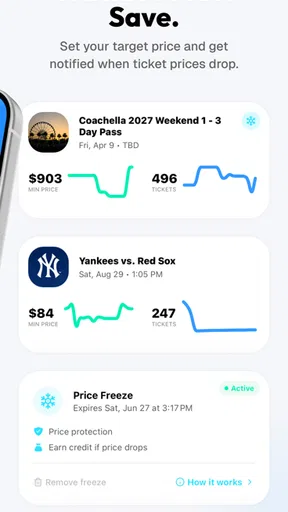
One feature I particularly enjoy is the Best Deal feature. It highlights the best value tickets by considering price and seat quality, which is perfect when you’re on a budget but still want great seats. The interactive seat map is another win, allowing you to see exactly where you’ll be sitting so there are no surprises.
TickPick also offers a bidding option, which I found quite exciting. You can place a bid on tickets and score them for a lower price if the seller accepts. It’s like the thrill of an auction without the stress!
Reliability and Trustworthy Service
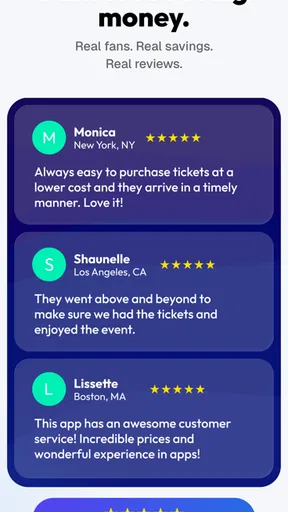
Whenever I’ve used TickPick, the service has been seamless. My tickets have always been delivered on time, and the customer support is top-notch. In the rare case that you encounter an issue, their support team is responsive and helpful, making sure your experience remains positive.
Security is another aspect where TickPick shines. I feel assured knowing that their platform is secure, and my ticket transactions are safe. Plus, the app has a solid reputation which adds to the peace of mind.
Final Thoughts
In conclusion, if you’re hunting for tickets without the extra fees and want a reliable, user-friendly platform, give TickPick a try. It’s become my trusted companion for planning nights out and ensuring I snag great seats at the best price. So next time you’re looking to attend that must-see event, check out TickPick—you won’t be disappointed!
Privacy and Permissions
See what permissions an app requests and how it handles your data.
- Location
- approximate location (network-based), precise location (GPS and network-based)
- Phone
- read phone status and identity
- Photos/Media/Files
- read the contents of your USB storage, modify or delete the contents of your USB storage
- Storage
- read the contents of your USB storage, modify or delete the contents of your USB storage
- Camera
- take pictures and videos
- Microphone
- record audio
- Wi-Fi connection information
- view Wi-Fi connections
- Device ID & call information
- read phone status and identity
- Other
- view network connections, full network access, change your audio settings, run at startup, draw over other apps, control vibration, prevent device from sleeping, modify system settings
Verdict
Strengths of TickPick - Live Event Tickets
- No service fees on ticket purchases.
- User-friendly interface and navigation.
- Advanced search filters for events.
- Secure and reliable payment options.
- Great customer support response time.
Limitations of TickPick - Live Event Tickets
- Limited ticket availability for some events.
- No ticket resale option within app.
- Occasional app crashes reported.
- Lacks virtual event ticketing options.
- Requires account creation to purchase.
Similar Picks in This Category
View All
Easy Quran Mp3 Audio Offline
Muslim Worldapp4.7

Invitation Maker: Cards & RSVP
Greetings Island4.9

StubHub - Live Event Tickets
StubHub4.3

Fever: Events & Tickets
Fever Labs4.7

Epic Freebie Games Radar
Arioch Pds - Apps & Games4.4

Invitation card Maker, Design
Splendid App Maker4.9
Frequently Asked Questions
What makes TickPick different from other ticketing platforms?
TickPick differentiates itself by offering a no-fee pricing model. This means the price you see is the price you pay, without any hidden fees at checkout. Additionally, TickPick uses an innovative bidding feature that allows users to name their price for tickets, potentially saving money compared to other platforms.
How does TickPick's bidding feature work?
TickPick's bidding feature allows users to suggest a price they are willing to pay for tickets. Sellers can then accept or counter these offers, giving buyers a chance to secure tickets at a price that suits their budget. This feature aims to provide more flexibility and affordability for ticket purchasers.
Is TickPick safe and reliable for purchasing event tickets?
Yes, TickPick is considered a safe and reliable platform. It offers a BuyerTrust Guarantee, ensuring that all tickets purchased are legitimate and will be valid for entry. In the rare case of an issue, TickPick provides a full refund or replacement tickets, ensuring a secure transaction experience.
Can I sell my tickets on TickPick if I can’t attend an event?
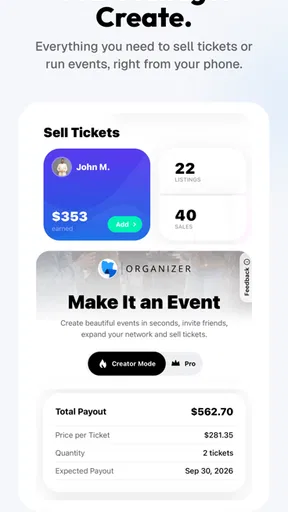
Absolutely, TickPick allows users to list their tickets for sale. The process is straightforward—you just need to create an account, list your tickets, and set your price. This feature enables users to easily recoup costs if they are unable to attend an event as planned.
Does TickPick offer customer support for ticket issues?
Yes, TickPick provides customer support to address any issues users may encounter. Whether it’s a problem with ticket delivery or questions about the event, their support team is available to assist. Users can reach out via phone, email, or live chat for a prompt response.
